Zavireqo
Vertex Archive
Vertex Archive
Couldn't load pickup availability
1. Problem Statement
UI/UX learners often collect notes, references, and interface ideas without a reliable method for organizing them. Important observations may become separated from the design decisions they were meant to support. This can lead to unclear content priorities, inconsistent screen structures, and user routes that require unnecessary steps. It may also become difficult to explain how research influenced the final interface direction. Vertex Archive introduces a structured way to document findings and connect them with practical design choices.
2. Solution
Vertex Archive presents a documentation-focused approach to UI/UX planning. Learners move through research organization, content mapping, screen relationships, interaction notes, and review methods. Each module adds a new layer to a central project archive, helping learners see how ideas evolve throughout a design process. Guided prompts encourage careful reasoning behind every layout and content decision. The course is designed to help learners create an organized record that supports thoughtful interface development.
3. What’s Inside
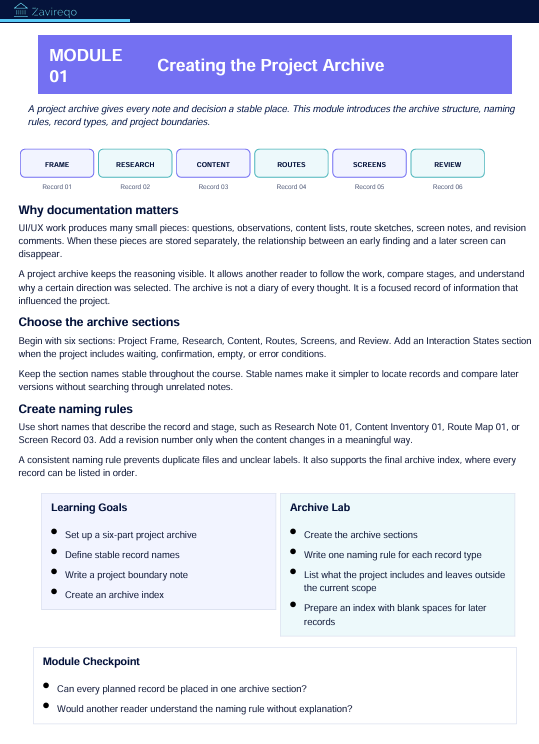
The opening module introduces the purpose of design documentation. Learners explore how project notes, research findings, content decisions, and interface observations can be arranged in one consistent structure.
The second module focuses on collecting and sorting research information. It covers observation notes, user questions, recurring themes, behavioral patterns, needs, concerns, and contextual details. Learners practise separating direct findings from personal assumptions.
The third module explores content inventories. Learners list required information, remove repeated items, group related content, and identify primary and supporting messages. This activity helps form a stronger foundation before individual screens are planned.
The fourth module covers user-route documentation. Learners outline starting points, actions, decisions, transitions, and completion states. They also review where unclear wording or unnecessary steps may interrupt a route.
The fifth module introduces screen records. Each record includes a screen purpose, content priority, primary action, supporting elements, and notes about its relationship with surrounding screens.
The sixth module examines interaction notes. Learners document how elements respond, what changes after an action, how feedback is presented, and what information appears during different interface states.
The seventh module focuses on design review. Learners compare research findings with planned screens, check whether content priorities remain consistent, and identify areas that need further development.
The course concludes with a structured archive project containing research summaries, a content map, a user route, several connected screen records, interaction notes, and a written review.
Additional materials include research-sorting sheets, screen-record pages, content inventory tables, route-planning prompts, interaction checklists, review questions, and reflection activities.
4. Who Is This For?
Vertex Archive is intended for learners who want to bring greater order to their UI/UX process. It suits students, developing designers, visual thinkers, and people who enjoy documenting how ideas connect.
The course may be particularly useful for learners who already create screen concepts but find it difficult to organize research, content, and reasoning around them. Familiarity with basic layout and user-flow concepts may be helpful, though the modules explain each documentation method in detail.
5. What You’ll Learn
- How to organize research findings into useful categories
- How to separate observations from assumptions
- How to prepare a detailed content inventory
- How to identify primary and supporting information
- How to document user routes and decision points
- How to define the purpose of each screen
- How to record interactions and interface states
- How to connect findings with layout decisions
- How to review consistency across a screen sequence
- How to identify missing or repeated content
- How to explain interface choices through written notes
- How to build a structured UI/UX project archive
6. 30-Day Refund Policy
Enrollment in Vertex Archive includes a 30-day refund period. A refund request may be submitted within 30 calendar days from the enrollment date.
Requests are reviewed according to the terms displayed during checkout and on the store policy page. Processing periods may vary based on the payment method and banking provider. Learners should read the full refund terms before enrollment.
Self-paced learning overview
- 📥 Digital file available after purchase
- 📚 Long-term availability
- 🔒 Secure checkout
- 🗓️ Content updated in 2026
How are the courses organized?
How are the courses organized?
Each course is divided into structured modules that cover one topic at a time. Learners can move through the materials in order, revisit earlier sections, and complete practical activities at their own pace.
Do I need prior UI/UX knowledge?
Do I need prior UI/UX knowledge?
No previous background is required. The materials begin with core concepts and gradually introduce research methods, interface structure, visual hierarchy, layout thinking, and design decisions.
What kind of materials are included?
What kind of materials are included?
Depending on the selected plan, materials may include written lessons, guided activities, design prompts, checklists, reference sheets, planning documents, and project-based exercises. Each plan presents its contents clearly before enrollment.
Share