Zavireqo
Free Sphere
Free Sphere
Couldn't load pickup availability
1. Problem Statement
Beginning UI/UX can feel confusing when ideas are presented without a clear order. New learners often meet research, layout, typography, user flows, and interface structure at the same time. This can make it difficult to understand how each topic connects to the wider design process. Many introductory materials provide definitions but do not show how those ideas appear in practical work. Free Sphere brings these foundational topics into one structured learning path.
2. Solution
Free Sphere presents UI/UX concepts through short, focused modules arranged in a logical sequence. Each section introduces a topic, explains its role, and connects it to a practical activity. Learners can explore how design choices relate to user needs, content structure, and visual clarity. The course encourages thoughtful observation rather than memorizing isolated terms. It is designed to help learners build a clear foundation for further study.
3. What’s Inside
Free Sphere includes an introductory collection of lessons and materials created around the early stages of UI/UX learning.
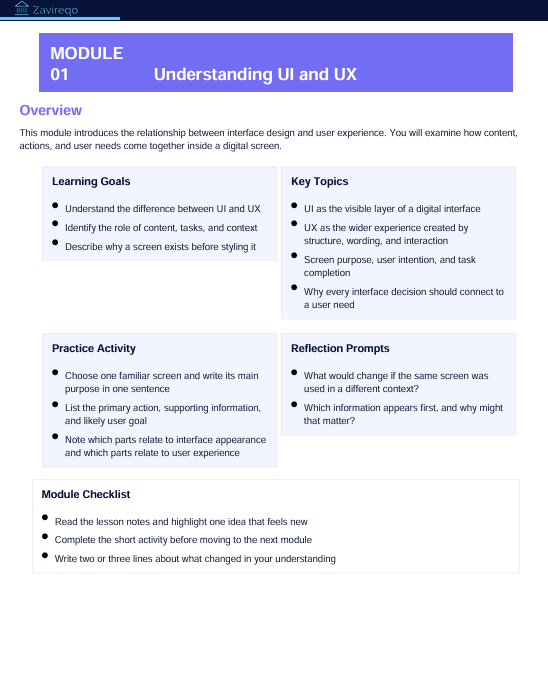
The opening module explains the difference between interface design and user experience. It introduces the role of user needs, goals, context, and clear communication within a digital interface.
The second module explores visual hierarchy. Learners examine how size, spacing, contrast, alignment, and placement influence the way information is read and understood.
The third module focuses on layout structure. It introduces grids, content groups, margins, sections, and repeated patterns that help create organized screens.
The fourth module covers basic user flows. Learners review how people move from one step to another and how designers can reduce confusion through clear actions and logical sequences.
The fifth module introduces early research thinking. It explains observation, basic questions, user needs, and the value of gathering information before making design decisions.
The course also includes practical prompts, short review activities, reflection questions, interface analysis tasks, and a small final exercise. These materials invite learners to apply each topic rather than only read about it.
4. Who Is This For?
Free Sphere is intended for people who are curious about UI/UX and want a structured introduction. It is suitable for beginners, students, creative thinkers, career explorers, and anyone interested in how digital interfaces are planned.
It may also be useful for people who already work with visual content and want to understand user-focused design principles. No previous design background is required. Learners only need curiosity, time for practice, and an interest in observing how interfaces communicate.
5. What You’ll Learn
- The difference between interface design and user experience
- How user needs influence design decisions
- How visual hierarchy guides attention
- How spacing and alignment support clear layouts
- How grids organize interface elements
- How basic user flows are planned
- How to review an interface with greater detail
- How to identify unclear actions or crowded sections
- How research questions can guide early design work
- How to organize content before creating a screen
- How to explain design choices in clear language
- How to complete a small UI/UX practice exercise
6. 30-Day Refund Policy
Enrollment in Free Sphere includes a 30-day refund period. A refund request may be submitted within 30 calendar days from the enrollment date.
Requests are reviewed according to the terms displayed at checkout and on the store policy page. Processing time may vary depending on the payment method and banking provider. Full details should be reviewed before enrollment.
Self-paced learning overview
- 📥 Digital file available after purchase
- 📚 Long-term availability
- 🔒 Secure checkout
- 🗓️ Content updated in 2026
How are the courses organized?
How are the courses organized?
Each course is divided into structured modules that cover one topic at a time. Learners can move through the materials in order, revisit earlier sections, and complete practical activities at their own pace.
Do I need prior UI/UX knowledge?
Do I need prior UI/UX knowledge?
No previous background is required. The materials begin with core concepts and gradually introduce research methods, interface structure, visual hierarchy, layout thinking, and design decisions.
What kind of materials are included?
What kind of materials are included?
Depending on the selected plan, materials may include written lessons, guided activities, design prompts, checklists, reference sheets, planning documents, and project-based exercises. Each plan presents its contents clearly before enrollment.
Share