Zavireqo
Drift Collection
Drift Collection
Couldn't load pickup availability
1. Problem Statement
A screen may appear visually organized while still creating confusion during use. Learners often focus on individual layouts without examining the complete route between actions, decisions, and outcomes. Small issues in labels, navigation, feedback, or content order can interrupt the experience across several screens. Without detailed journey planning, it becomes difficult to identify where hesitation or unnecessary repetition may occur. Drift Collection introduces methods for studying interface movement as one connected sequence.
2. Solution
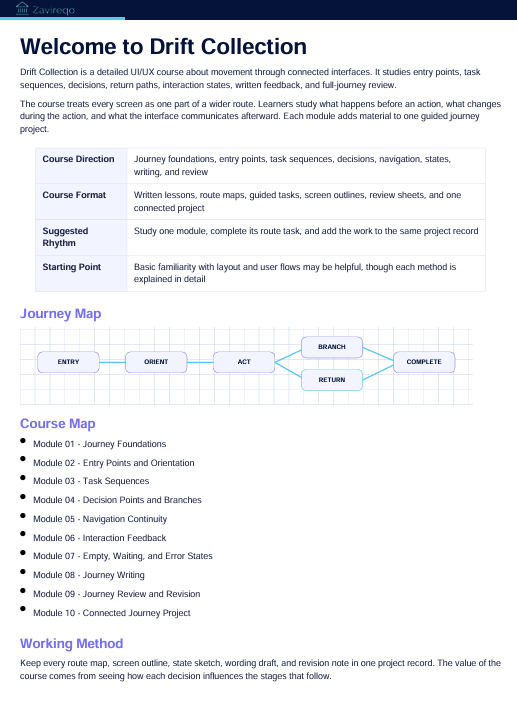
Drift Collection guides learners through the planning and review of user journeys from beginning to completion. Each module examines a different part of interface movement, including entry points, actions, decisions, feedback, and alternate routes. Guided exercises connect journey notes with screen structure and content placement. Learners review how each step relates to the step before and after it. The curriculum supports a thoughtful approach to creating coherent interaction sequences.
3. What’s Inside
The opening module introduces journey thinking and explains why interfaces should be reviewed as connected experiences rather than isolated screens. Learners identify a starting point, a user intention, required actions, and a defined completion state.
The second module focuses on entry points. It examines how headings, introductory content, navigation labels, and primary actions communicate what a person can do from the beginning of a route.
The third module covers task sequences. Learners divide a larger activity into smaller steps, arrange them in a logical order, and review whether any stage contains repeated or unnecessary actions.
The fourth module explores decision points. It introduces branches, alternate routes, optional actions, return paths, and moments where additional guidance may be helpful.
The fifth module examines interface feedback. Learners study confirmation messages, waiting states, errors, empty states, and changes that appear after an action. Activities focus on writing concise messages and choosing suitable placement for them.
The sixth module develops screen-to-screen continuity. Learners compare headings, actions, spacing patterns, content order, and visual signals across several connected layouts.
The seventh module introduces journey review techniques. Learners trace each route, record areas of hesitation, identify missing information, and note where wording or structure may need revision.
The final module brings these topics together through a guided journey project. Learners create a route map, define several interaction states, outline connected screens, and prepare a written review of their design decisions.
Included materials feature journey maps, route worksheets, state-planning pages, content prompts, message-writing activities, screen comparison sheets, review checklists, and reflection questions.
4. Who Is This For?
Drift Collection is intended for learners who want to study how interfaces work across several connected steps. It suits students, developing designers, creative thinkers, and people interested in interaction planning.
The course may also be useful for learners who can arrange individual screens but want to improve continuity between them. Basic familiarity with hierarchy, layout, and user flows may be helpful, though each method is introduced through detailed guidance.
5. What You’ll Learn
- How to define a complete user journey
- How to identify meaningful entry points
- How to divide tasks into clear stages
- How to plan decision points and alternate routes
- How to document interface states
- How to write concise feedback messages
- How to review continuity between screens
- How to identify repeated or unnecessary actions
- How to map return paths and optional actions
- How to connect content order with user movement
- How to evaluate a route from beginning to completion
- How to present journey decisions through written notes
6. 30-Day Refund Terms
Enrollment in Drift Collection includes a 30-day refund period. A refund request may be submitted within 30 calendar days from the enrollment date.
Requests are reviewed under the terms presented during checkout and on the store policy page. Processing periods may vary depending on the payment method and banking provider. Learners should review the complete refund terms before enrollment.
Self-paced learning overview
- 📥 Digital file available after purchase
- 📚 Long-term availability
- 🔒 Secure checkout
- 🗓️ Content updated in 2026
How are the courses organized?
How are the courses organized?
Each course is divided into structured modules that cover one topic at a time. Learners can move through the materials in order, revisit earlier sections, and complete practical activities at their own pace.
Do I need prior UI/UX knowledge?
Do I need prior UI/UX knowledge?
No previous background is required. The materials begin with core concepts and gradually introduce research methods, interface structure, visual hierarchy, layout thinking, and design decisions.
What kind of materials are included?
What kind of materials are included?
Depending on the selected plan, materials may include written lessons, guided activities, design prompts, checklists, reference sheets, planning documents, and project-based exercises. Each plan presents its contents clearly before enrollment.
Share